

Prestashop 的back office tab 筆記 - part 6
此篇是對應筆記3的1.5+版本, 在1.5之前要新增一個form 真係話難唔難但係話易又真係唔算易的, 因為入面包括了很多的html code 及頁面上的設定, 但來到1.5 就真係變得容易了很多呢...

在1.5, 我地只要overwrite renderForm 這個function 更可以了,
可以看到在1.5裏,系統已經提供了內置的function讓我地只需要設定變數fields_form就能建立好張form
利用fields_form['legend']可以設定form legend 的部份...
fields_form['input'] 讓我們設定能提供的變數, 先看看以下的頁面

它其實是由下面的code所建立成
 由於第一個item(product_name),不是直接由database中取出來的(頁面所設定的className), 所以它的內容要透過fields_value來設定
public function renderForm(){
 $prod = new Product($this->last_pid);

 $this->fields_form = array(
  'legend' => array(
   'title' => $this->l('Fast Get Discount Setting')
  ),
  'input' => array(
   array(
    'type' => 'text',
    'label' => $this->l('Product name').":",
    'disabled' => true,
    'name' => 'product_name'
   ),
   array(
    'type' => 'hidden',
    'name' => 'id_product'
   ),
   array(
    'type' => 'text',
    'label' => $this->l('No. of Sold').":",
    'name' => 'position',
    'size' => 25,
    'required' => true,
    'hint' => sprintf($this->l('Allowed number only'))
   ),
   array(
    'type' => 'text',
    'label' => $this->l('Reduction').":",
    'name' => 'reduction',
    'size' => 25,
    'required' => true,
    'hint' => sprintf($this->l('Input the Amount/Percentage you want to discount.').$this->l('Allowed number only'))
   ),
   array(
    'type' => 'select',
    'label' => $this->l('Reduction Type').":",
    'name' => 'reduction_type',
    'options' => array(
     'query' => array(array('reduction_type' => 'amount', 'name' => $this->l('Amount')), array('reduction_type' => 'percentage', 'name' => $this->l('Percentage'))),
     'id' => 'reduction_type',
     'name' => 'name'
    )
   ),
   array(
    'type' => 'date',
    'label' => $this->l('From').":",
    'name' => 'from',
    'size' => 20,
    'class' => 'timepicker',
    'desc' => sprintf($this->l('Leave blank to clear the time'))
   ),
   array(
    'type' => 'date',
    'label' => $this->l('To').":",
    'name' => 'to',
    'size' => 20,
    'class' => 'timepicker',
    'desc' => sprintf($this->l('Leave blank to clear the time'))
   ),
  ),
  'submit' => array(
   'title' => $this->l('Save'),
   'class' => 'button'
  )
 );

 $this->fields_value = array(
  'product_name' => $prod->name[$this->context->language->id]
 );

 return parent::renderForm();
}
可以看到在1.5裏,系統已經提供了內置的function讓我地只需要設定變數fields_form就能建立好張form
利用fields_form['legend']可以設定form legend 的部份...
'legend' => array(
 'title' => $this->l('Fast Get Discount Setting')
 ),
 |
| 設定後的效果 |
fields_form['input'] 讓我們設定能提供的變數, 先看看以下的頁面
它其實是由下面的code所建立成
array(
 'type' => 'text',
 'label' => $this->l('Product name').":",
 'disabled' => true,
 'name' => 'product_name'
),
array(
 'type' => 'hidden',
 'name' => 'id_product'
),
array(
 'type' => 'text',
 'label' => $this->l('No. of Sold').":",
 'name' => 'position',
 'size' => 25,
 'required' => true,
 'hint' => sprintf($this->l('Allowed number only'))
),
- 第一個item我地設定disable為true後, 頁面上這個field 就會變成為唯讀
- 第二個item,我地設定它為hidden,所以在頁面上是看不到它的存在
- 第三個item,我地設定required為true,所以可以看到*在後面,而且也因為設定了hint,所以在滑鼠移上去時會出現提示信息
'submit' => array(
 'title' => $this->l('Save'),
 'class' => 'button'
)

$this->fields_value = array(
 'product_name' => $prod->name[$this->context->language->id]
);
最後,當然要call 番parent的renderform, 如果唔係可是會出現白頁的情況呢!
return parent::renderForm();

總算完成了Inferno Diablo
由於之前的遊戲難道設定得有點難(卡了在act 2 呢), 再加上WoW expansion 的推出後更加沒有點玩這個diablo, 所以一直也未能完成inferno 級的diablo 呢...
不過最近終於在佢多次nerf後,總算是完成了這個inferno 的diablo 了, 不過佢nerf完之後真係好似易打左好多呢

Prestashop 的back office tab 筆記 - Part 5
之前講到prestashop升級至1.5.x後它的backoffice 改動很太,所以基本上admin tab 也是要重新寫過的呢,如果看看它的change log, 基本上v1.5.0.1把之前的admintab 也換了是controller 呢,所以寫法上也會有一點點的出入,所以之前的筆記2及3是不太適用於1.5+呢
好首先最主要的改動是我地由之前extends AdminTab變成為AdminController
它的constructor 基本上是類似的, 不過之前所用的fieldsDisplay就換成為fields_list
參考example:
除此之外之前是利用edit/delete的變數來設定每一行可以做的action, 但在controller的叫法則改變了
也可以利用bulk_action來設定批量的移除
class AdminFastGetDiscountSettingControllerCore extends AdminController{
...
}
它的constructor 基本上是類似的, 不過之前所用的fieldsDisplay就換成為fields_list
參考example:
public function __construct()
{
 $this->table = 'product_fast_get_discount';
 $this->className = 'FastGetDiscount';
 $this->lang = false;

 $this->identifier = "id_pfgd";

 $this->addRowAction('edit');
 $this->addRowAction('delete');

 $this->bulk_actions = array('delete' => array('text' => $this->l('Delete selected'), 'confirm' => $this->l('Delete selected items?')));

 $this->fields_list = array(
  'id_pfgd' => array(
   'title' => $this->l('ID'),
   'align' => 'center',
   'width' => 25
  ),
  'product_name' => array(
   'title' => $this->l('Name'),
   'align' => 'left',
   'orderby' => false,
   'filter' => false,
   'search' => false
  ),
  'position' => array(
   'title' => $this->l('No. of Sold'),
   'align' => 'center',
   'width' => 90
  ),
  'reduction' => array(
   'title' => $this->l('Reduction'),
   'align' => 'right',
   'width' => 100
  )
 );

 parent::__construct();
}
除此之外之前是利用edit/delete的變數來設定每一行可以做的action, 但在controller的叫法則改變了
// 之前在AdminTab 時用$this->edit=true;
$this->addRowAction('edit');
// 之前在AdminTab 時用$this->delete=true;
$this->addRowAction('delete');
也可以利用bulk_action來設定批量的移除
$this->bulk_actions = array(
 'delete' => array(
  'text' => $this->l('Delete selected'),
  'confirm' => $this->l('Delete selected items?'))
 );
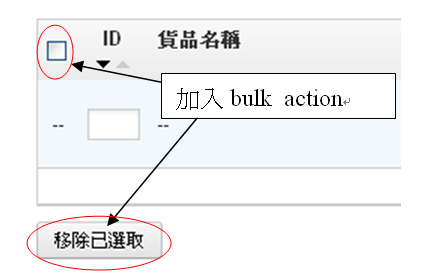 |
| 加入批量的效果 |
Subscribe to:
Posts (Atom)
About Me

訂閱


 Posts
All Comments
Posts
All Comments
最新文章
notebook upgrade
繼上次幫部HP換電後,今次再次為notebook 加ram同換harddisk 來延長它的壽命 不過可惜部機不能support MVNE只能support NGFF, 所以只好買NGFF 的,現在買NGFF選擇真的不多,所以感覺上比起買隻MVNE來都有點貴,由於選擇不多,仲...


過去30天熱門文章
-
Php 有autoload 的功能簡單來說就是只要寫了個 __autoload($class_name) 之後,佢會當你嘗試create 一些class時佢會訧下行這個function 你設定了的include file 以下是我的__autoload class fun...
-
 之前theme hospital 的原班人馬推出了新的遊戲two point hospital, 當年對theme hospital 的著迷, 當然有新的, 要買來支持一下, 但就係因為咁,發現部機玩一陣就會叫了, 這個係因為 CPU overheat 了...=.=, 開hwm...
 -
明天的10時30分就是那個神奇task 的行動時間.... 就算到這一刻,我還是覺得這個task 有一點神奇,究竟萬一不幸地被選中了,可唔可以reject的呢? 難道剛剛脫離了web 的我又要走回web development @@, 我可幾喜歡現在我在做的data wa...


